 Philippe Gaultier
Philippe Gaultier
Philippe Gaultier
Published on 2026-07-07. Last modified on 2026-07-16.
Another day, another optimization story with CockroachDB. What's interesting with optimizing a complex application is that it's like a d20 (a die with 20 sides): once a side is done, another side needs attention.
In the other parts I have improved latency, SQL CPU time, retries, and number of rows scanned. Then, I stumbled upon a query that's slow (10.4s max latency) but all other metrics are fine. That puzzled me for a bit. Especially because it's a simple query: list all identities (a.k.a. users, a.k.a accounts) with some criteria. This is exposed as an API endpoint that accepts a number of parameters. And it returns just a handful of items: looking at the number of requested items, which is also a (bounded) query parameter, it's typically 5. It should be fast!
As always, the code is open-source!
So my first instinct is to think: well, an API user built a query with weird parameters and now the query is not using an index, or the wrong one. But no, the CockroachDB dashboard does not warn about a suboptimal plan, I can see the correct index is used. Well, now my next guess is that the query is perhaps quite convoluted and thus hard for the query optimizer to, well, optimize.
But also no, it's basically just: SELECT * FROM identities WHERE <some criteria> LIMIT 5. Taking 10+s for that is egregious, I think everybody will agree.
But when I re-read the query, I noticed something new: it's actually SELECT DISTINCT * FROM ..., not just SELECT * FROM. Aha, maybe that's why?
So now I have two questions: 1) How slow is it to deduplicate a few rows? and 2) Why do we even use DISTINCT here? This table does not have duplicates!
So now I go read the code and I notice something: the API accepts a parameter that controls how much data we return, it's conceptually thin or full. When it's thin, we only read the identities table: this is the query I showed. When it's full, we JOIN all the related tables (and there are a lot of them) to get all the related data.
When full is provided in the API call, due to the JOINs, one identity will typically correspond to many rows in the result set. That's why the author of the code uses DISTINCT... maybe?
The code building the SQL query based on the API parameters is quite complex and it seems to me that the DISTINCT is not really needed, if we used stricter criteria in the WHERE part or in the JOIN clauses, or perhaps if we deduplicated in the application code.
Due to lack of time and faced with convoluted code, and fearing making a breaking change, I slowly backed away from the code path for full. A dragon for another time.
But: for the thin case, it's trivial to see that DISTINCT is not needed.
Back to my first question: why is DISTINCT even slow? Well, looking at the identities schema, it has at least two columns of type JSONB. They store large JSON documents. So that's why: DISTINCT forces the database to compare all columns of the rows for deduplication, and if some columns are big, this is costly.
Ok, but a costly operation done on 5 rows should still not take 10s!
Well... the order of operations matters. The database essentially does this:
WHERE .... This could be thousands of rows.DISTINCT.LIMIT.So, we deduplicate thousands of rows, just to return 5 - and there are no duplicates to start with!
If we are in the thin case, we build this query, without DISTINCT: SELECT * from identities WHERE ... LIMIT 5.
Otherwise, in case of the full case, we keep the DISTINCT: SELECT DISTINCT * from identities WHERE ... JOIN <a million tables>.
Alternative, suboptimal fix: instead of using the whole row for DISTINCT, we could make it look at only one column, e.g. DISTINCT ON (id). That makes DISTINCT faster. But what is even faster than that, is no DISTINCT at all, when it's not needed.
As the official docs put it:
SELECT DISTINCT allows you to obtain unique entries from a query by removing duplicate entries. However, SELECT DISTINCT is computationally expensive. As a performance best practice, use SELECT with the WHERE clause instead.
Interestingly, the SELECT DISTINCT query had very little CPU time. Perhaps it's an accounting bug, or perhaps the time due to DISTINCT is counted somewhere else, or perhaps most of the time was simply waiting on the network to receive these thousands of rows, that we immediately threw away.
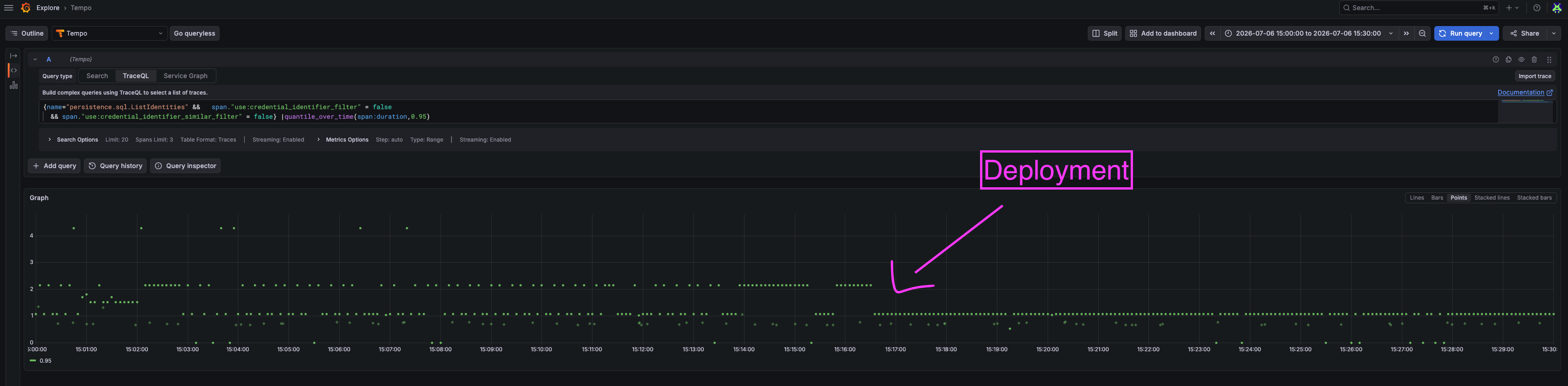
p95 goes from 1-10s to <1s:
In fact, all latencies > 1s disappeared:
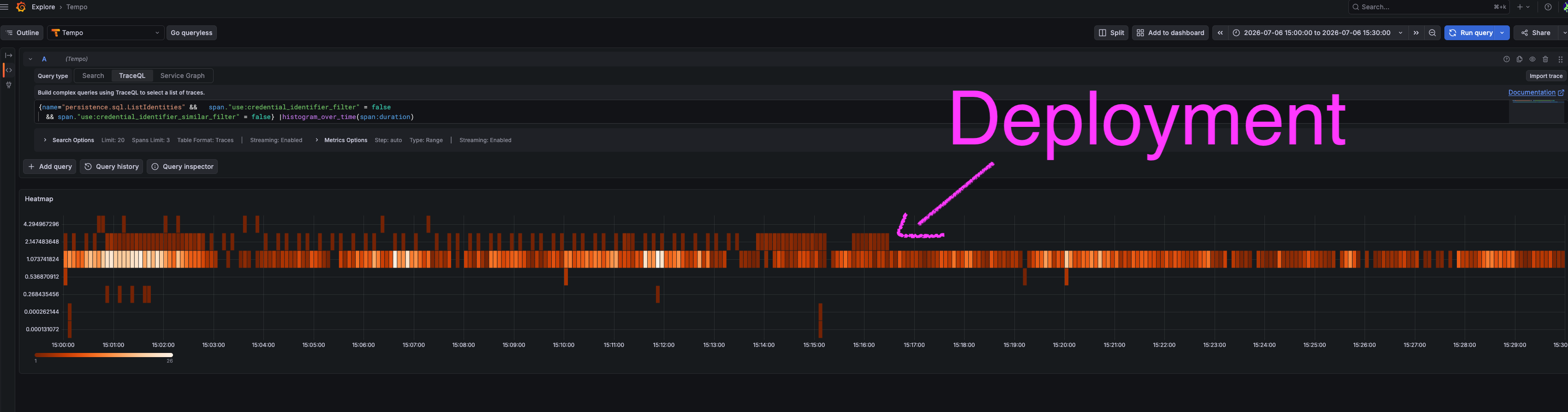
x10 speed-up by simply omitting DISTINCT, just a few lines of diff. Not bad.
Looking at what the query does now, it spends its time waiting on the network, so nothing easy to further optimize here.
Sometimes metrics can deceive us. I would have expected to see a high CPU time due to DISTINCT but it was not the case.
As always, 'optimizing' typically means: do less work. Not: make the work faster.
Complex query building logic is easy to get wrong and often results in sub-optimal queries. Look at the SQL that actually runs, and optimize for the common case of the API usage, based on traces/logs/metrics.
Remember that the order of operations in the SQL query is not the same as the order of operations in the database. By looking at the plan with EXPLAIN ANALYZE, we can see the true order.
Finally, if you see a trivial case to optimize, coupled with a more intricate case, it's fine to go half-way and only tackle the easy case. Deploy that, confirm it did help, and then you can revisit the hard case. It's already great for your users and now you are sure you are on the right path. Don't let perfect be the enemy of good.
If you enjoy what you're reading, you want to support me, and can afford it: Support me. That allows me to write more cool articles!
This blog is open-source! If you find a problem, please open a Github issue. The content of this blog as well as the code snippets are under the BSD-3 License which I also usually use for all my personal projects. It's basically free for every use but you have to mention me as the original author.
My views are my own and not those of my employer.